Introduction
Regression functions are provided for examining the association between two continuous variables.
Examples of continuous variables are alpha diversity metrics, taxa abundances, and sample metadata such as age or BMI. These all have a numeric range in which a data point can take on any value in that range.
Children Heights
To start with a simple example, consider the children
dataset from the R package npregfast. It records age, sex,
and height for 2500 children aged 5 through 19 years.
head(npregfast::children)
#>      sex height   age
#> 1   male 150.77 13.25
#> 2 female 170.59 14.17
#> 3 female 167.31 15.17
#> 4 female 165.72 16.58
#> 5 female 171.67 15.17
#> 6 female 143.74 12.67
Height vs Age
First, let’s plot ‘age’ vs ‘height’, and overlay a best-fit linear trendline.
With this plot, we’re testing the hypothesis “as you get older, your height changes”.
stats_corrplot(
  df       = npregfast::children,  # dataset
  x        = 'age',                # x-axis variable
  y        = 'height',             # y-axis variable
  layers   = 'tp',                 # show trendline and points
  test     = 'emtrends',           # run stats on the slope
  fit      = 'lm',                 # straight trendline
  pt.size  = 0.2,                  # make points smaller
  pt.alpha = 0.2 )                 # and semi-transparent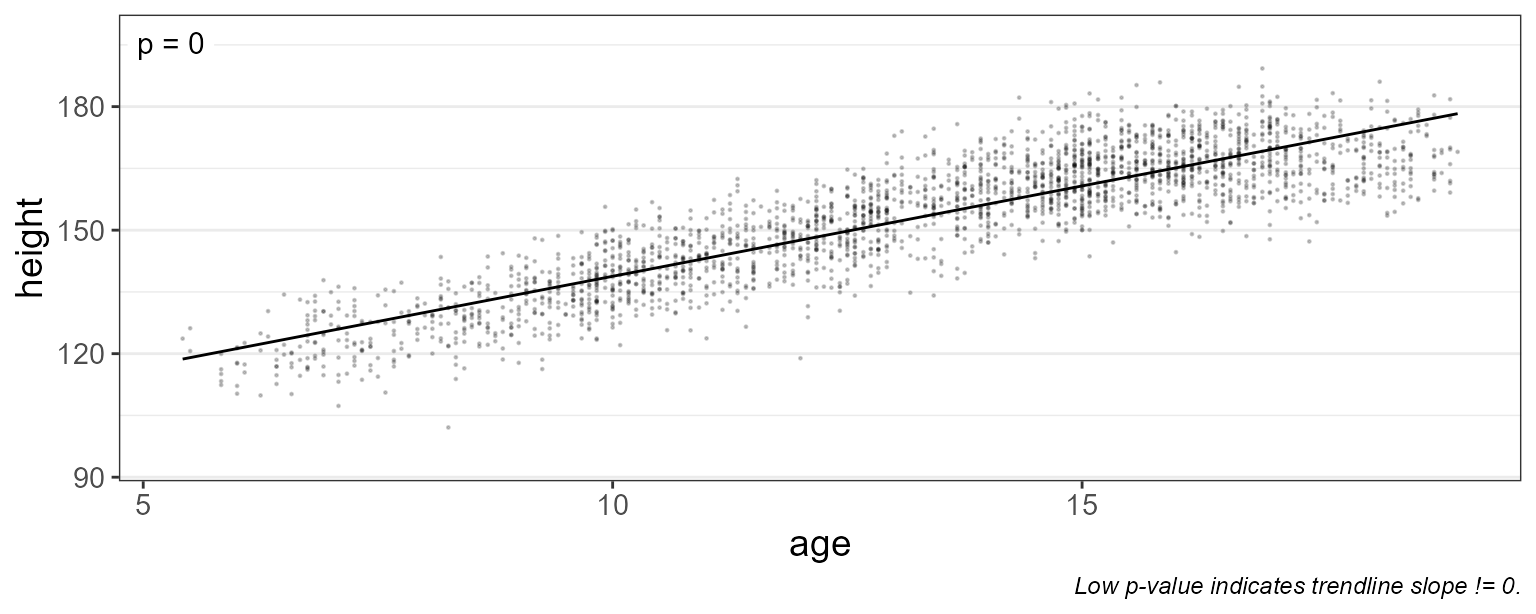
As you’d expect, the trendline’s slope is positive, with a p-value far below 0.05. Therefore it’s safe to say that height changes with age.
Grouped by Sex
Is the rate of growth influenced by sex? We can add
stat.by = "sex" to draw separate lines for males and
females.
stats_corrplot(
  df       = npregfast::children,  # dataset
  x        = 'age',                # x-axis variable
  y        = 'height',             # y-axis variable
  stat.by  = 'sex',                # statistical groups   <====
  fit      = 'lm',                 # straight trendline
  layers   = 'tp',                 # show trendline and points
  test     = 'emtrends',           # run stats on the slopes
  pt.size  = 0.2 )                 # make points smaller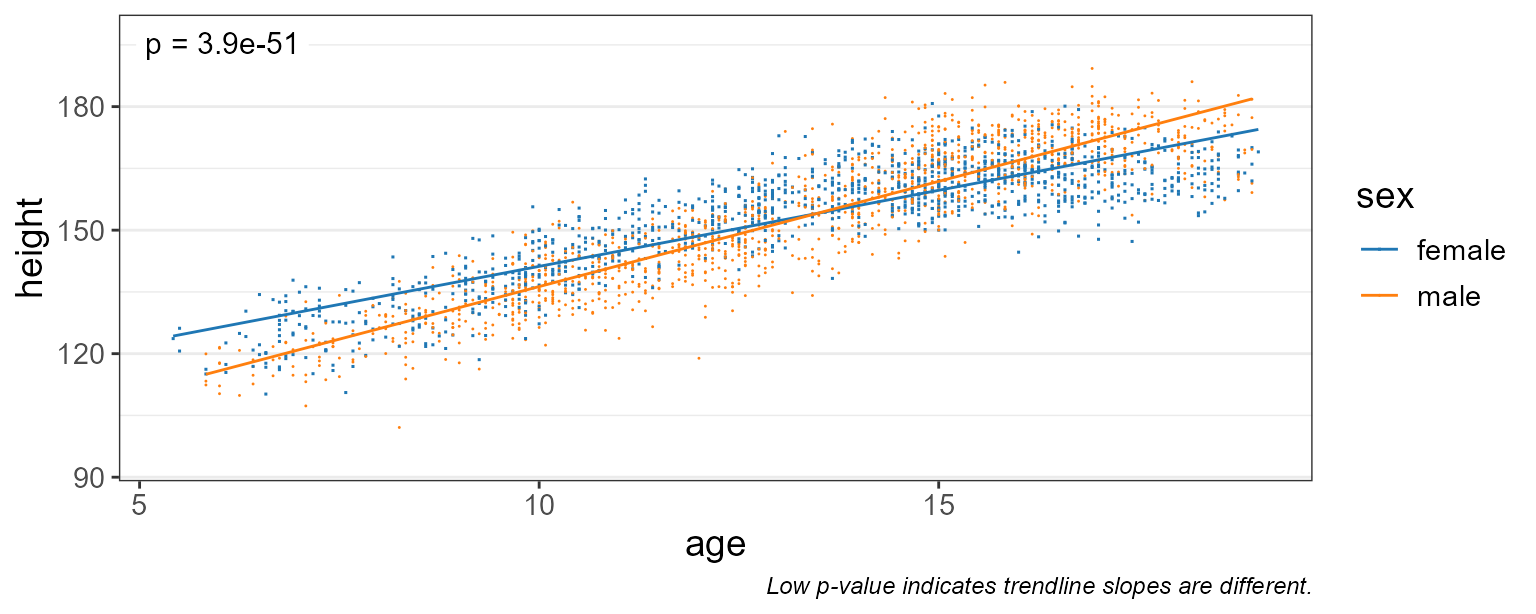
Here, the very small p-value indicates that males and females do have different growth rates.
If you look at the captions of the last two plots, you’ll notice that the p-value test automatically changes.
- When
stat.by = NULL,test = "emtrends"will test if the slope is zero. - When
stat.byis notNULL,test = "emtrends"will test if the trendline slopes are equal.
With fit = "lm" the slope is the same everywhere, so
these are tests of the fitted lines as a whole.
Smoothed Fit
Linear trendlines probably aren’t the best way to model growth rates.
Setting fit = "gam" will use a generalized additive model
which fits several sub-ranges of age with independent splines.
stats_corrplot(
  df       = npregfast::children,  # dataset
  x        = 'age',                # x-axis variable
  y        = 'height',             # y-axis variable
  stat.by  = 'sex',                # statistical groups
  fit      = 'gam',                # smoothed trendline   <====
  layers   = 'tp',                 # show trendline and points
  test     = 'emtrends',           # run stats on the slopes
  pt.size  = 0.2 )                 # make points smaller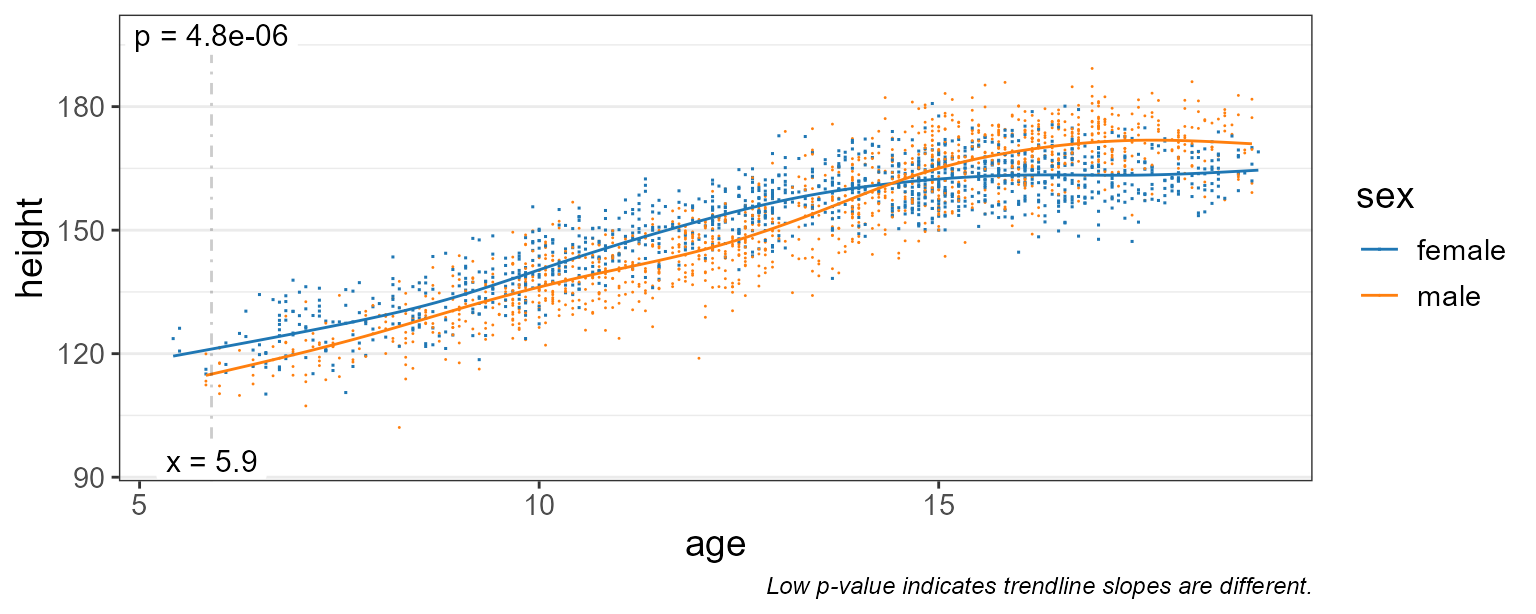
This gives us a much better idea of the moving average over time.
With a smoothed fit, the slope changes along the curve, so the difference in slopes has to be evaluated at a particular age. By default rbiom uses the median age, marked on the plot with a vertical line. See Specific Timepoints to choose other ages.
Difference in Means
Let’s set test = "emmeans" instead, and show the 95%
confidence interval instead of all the data points.
stats_corrplot(
  df       = npregfast::children,  # dataset
  x        = 'age',                # x-axis variable
  y        = 'height',             # y-axis variable
  stat.by  = 'sex',                # statistical groups
  fit      = 'gam',                # smoothed trendline
  layers   = 'tc',                 # show trendline with conf. int.
  test     = 'emmeans' )           # run stats on the means   <====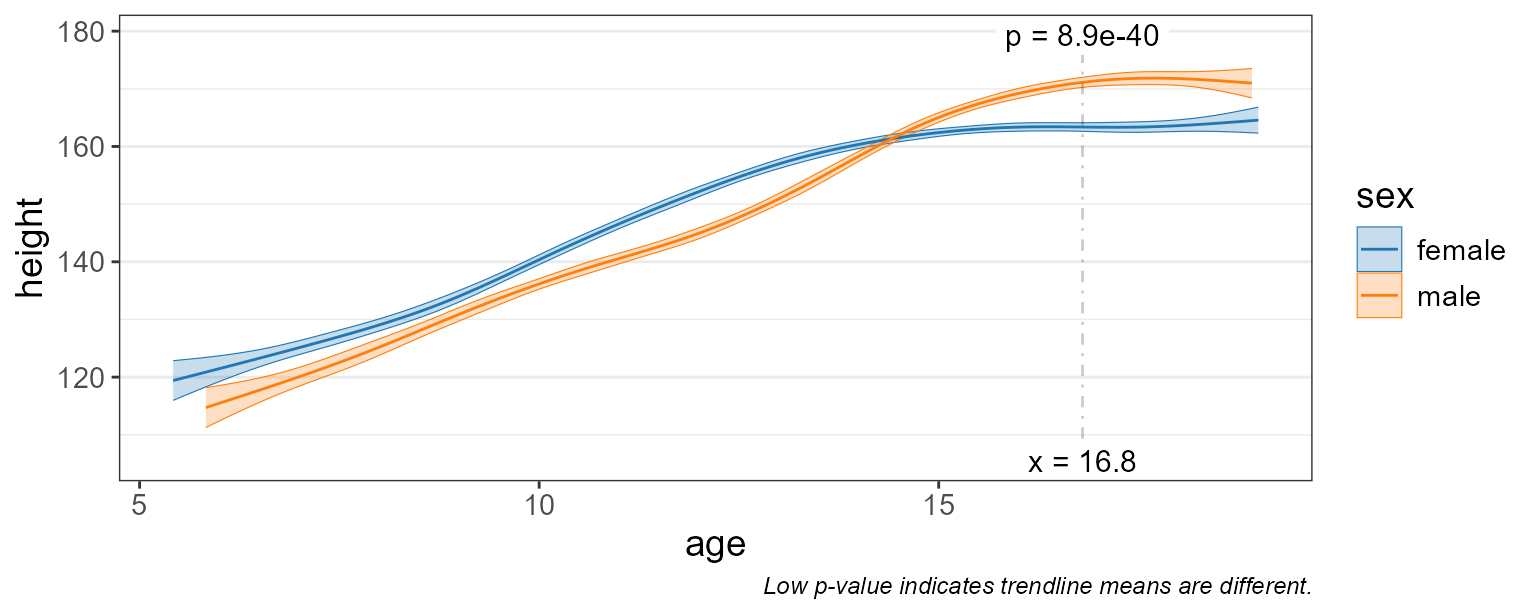
The difference in mean height between males and females is tested at the median age.
Statistics Table
The complete statistical output is attached to the returned plot as
$stats.
You can also directly generate this table with the
stats_table() function.
st <- stats_table(
  df       = npregfast::children,  # dataset
  regr     = 'age',                # x-axis variable
  resp     = 'height',             # y-axis variable
  stat.by  = 'sex',                # statistical groups
  fit      = 'gam',                # generalized additive model
  test     = 'emmeans' )           # run stats on the means

# Print the table transposed, since it's one row by 14 columns.
t(st)
#>              [,1]
#> age          "13.83"
#> sex          "female - male"
#> .mean.diff   "2.825712"
#> .h1          "!= 0"
#> .p.val       "9.178591e-07"
#> .adj.p       "9.178591e-07"
#> .lower       "1.699699"
#> .upper       "3.951725"
#> .effect.size "0.4406573"
#> .se          "0.574227"
#> .n           "2500"
#> .df          "2484.845"
#> .t.ratio     "4.920897"
#> .r.sqr       "0.8314119"
#> .dev.expl    "0.8323668"
#> .aic         "16403.85"
#> .bic         "16500.31"
#> .loglik      "-8185.366"
Depending on the arguments given, the estimate term will be one of:
| Field | Description | test |
stat.by |
fit |
|---|---|---|---|---|
| .slope | Slope of the fitted line. | either | NULL |
"lm", "log"
|
| .f | F statistic of the smooth term. | "emmeans" |
NULL |
"gam" |
| .slope | Local slope at at. |
"emtrends" |
NULL |
"gam" |
| .mean.diff | Difference in means at at. |
"emmeans" |
not NULL
|
any |
| .slope.diff | Difference in slopes (at at for gam). |
"emtrends" |
not NULL
|
any |
Without stat.by, the question is whether the response is
associated with regr at all: a test of the slope for
straight-line fits, or of the whole smooth curve for
fit = "gam".
Other fields in this table include:
| Field | Description |
|---|---|
| .h1 | Alternative hypothesis. |
| .p.val | Probability, under the null hypothesis, of a result at least as extreme as observed. |
| .adj.p |
.p.val after adjusting for multiple comparisons across
the whole table. |
| .effect.size | Effect size. See emmeans::eff_size(). |
| .lower | Confidence interval lower bound. |
| .upper | Confidence interval upper bound. |
| .se | Standard error. |
| .n | Number of samples. |
| .df | Degrees of freedom. |
| .t.ratio |
(.mean.diff, .slope, or .slope.diff) /
.se
|
| .edf | Effective degrees of freedom of a gam smooth term. |
| .r.sqr | Proportion of variation explained by the model. |
| .adj.r |
.r.sqr, taking degrees of freedom into account. |
| .dev.expl | Proportion of deviance explained (gam models). |
| .aic | Akaike Information Criterion (predictive models). |
| .bic | Bayesian Information Criterion (descriptive models). |
| .loglik | Log-likelihood goodness-of-fit score. |
Marginal Means
Estimated marginal means (EMMs; also known as least-squares means)
are means extracted from a statistical model. This allows EMMs to take
into account more complex associations and produce confidence intervals
in addition to estimates of the mean. This approach is employed by
rbiom’s 'emmeans' and 'emtrends' tests, using
the emmeans::emmeans package.
Additional information on EMMs is available at:
Goodness of Fit
The statistics table has several fields for assessing how well the model fits the data.
-
.r.sqr- Coefficient of Determination (R2); range: 0-1, higher is better. Proportion of variation explained by the model. -
.adj.r- R2, taking degrees of freedom into account (straight-line fits). -
.dev.expl- Proportion of deviance explained (gamfits); higher is better. -
.aic- Akaike Information Criterion; lower is better. Preferred when using model for prediction. -
.bic- Bayesian Information Criterion; lower is better. Preferred when using model for interpretation. -
.loglik- Log-Likelihood; higher values are better.
Not all of these values can be computed for every model.
As an example, lets pull the AIC value from the statistics table generated in the last section.
st$.aic
#> [1] 16403.85
These values can be used to decide which fit argument to
use ("lm", "log", or "gam"), as
long as the models are fit to the same data.
gof <- lapply(c("lm", "log", "gam"), function (fit) {
  st <- stats_table(npregfast::children, "age", "height", "sex", fit = fit)
  data.frame(fit = fit, .r.sqr = st$.r.sqr, .aic = st$.aic, .bic = st$.bic, .loglik = st$.loglik)
})

do.call(rbind, gof)
#>   fit    .r.sqr     .aic     .bic   .loglik
#> 1  lm 0.7896923 16947.72 16976.84 -8468.858
#> 2 log 0.8031003 16783.02 16812.14 -8386.512
#> 3 gam 0.8314119 16403.85 16500.31 -8185.366
Based on the above table, fit = "gam" has the lowest
AIC, lowest BIC, and highest Log-Likelihood, and is therefore the best
model of the three to use for this set of data and variables.
Alternative Hypothesis
The three columns .mean.diff, .h1, and
.p.val together show the hypothesis and its outcome. Above,
we’re asking if .mean.diff is non-zero. Since
.p.val is less than 0.05 we can say that it is.
dplyr::select(st, .mean.diff:.p.val)
#> # Model:    gam(.resp ~ s(.regr, by = .stat.by, bs = "cs") + .stat.by, method =
#> #   'REML')
#> # A tibble: 1 × 3
#>   .mean.diff .h1        .p.val
#>        <dbl> <fct>       <dbl>
#> 1       2.83 != 0  0.000000918
For a more complete review of alternative hypotheses, see the rbiom statistics article.
Checking Residuals
One of the best ways to assess the quality of your model is to interrogate the residuals. A “residual” is the vertical distance from a data point to the trendline; the difference between observed and predicted (fitted) values.
High quality models will have randomly distributed residuals. Three
common plots for visualizing residuals are normal Q-Q plots, residual vs
fitted value plots, and scale-location plots. You can add these plots to
any rbiom corrplot by setting check = TRUE.
stats_corrplot(
  df       = npregfast::children,  # dataset
  x        = 'age',                # x-axis variable
  y        = 'height',             # y-axis variable
  stat.by  = 'sex',                # statistical groups
  fit      = 'gam',                # smoothed trendline
  layers   = 'tc',                 # show trendline with conf. int.
  test     = 'emmeans',            # run stats on the means
  check    = TRUE )                # display diagnostic plots   <====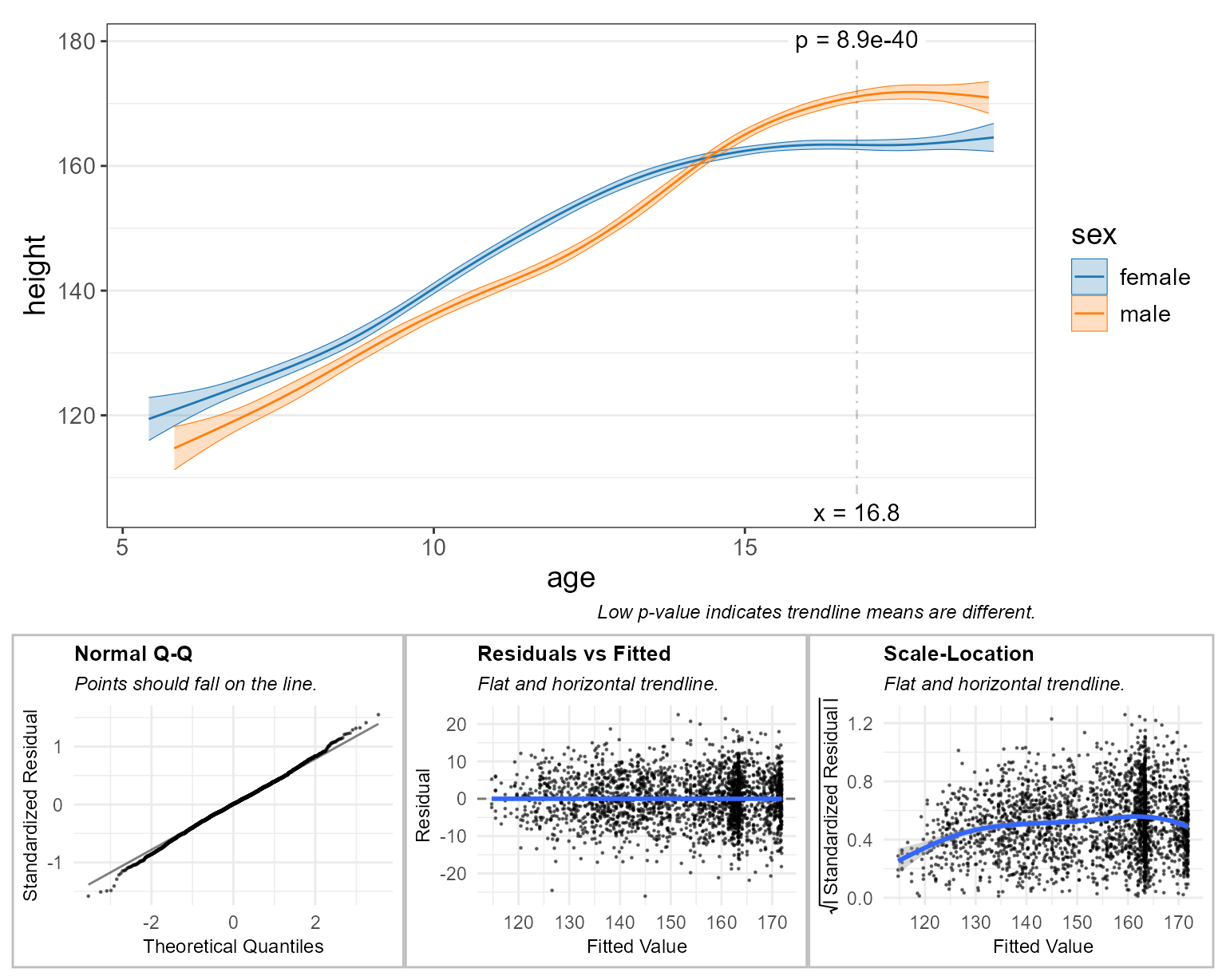
The subtitle for each plot tells you what a high quality model will look like. For example, the “Normal Q-Q” plot says that “Points should fall on the line.” In this case they do, so that particular check indicates high-quality.
These diagnostic plots are largely subjective/qualitative. That is, you must use your best judgement to decide if the residuals appear to pass or fail the checks.
A complete explanation of these diagnostic plots is beyond the scope of this article. Readers are encouraged to explore the topic further at sites such as:
GEMS Dataset
Going forward we’ll use the gems dataset included with
rbiom. GEMS is a case-control study comprising 1,006 stool samples from
young children with or without diarrhea in four low-income countries.
The original Nature article by Eric J. de Muinck and Pal Trosvik for
this data set is available online for free at Individuality
and Convergence of the Infant Gut Microbiota During the First Year of
Life.
gems
#>
#> ══ Global Enteric Multicenter Study ════════════════════════
#>
#> Stool samples collected from 1006 participants under the
#> age of 5 from Bangladesh, Gambia, Kenya, and Mali. Includes
#> 492 healthy controls and 514 moderate-to-severe diarrhea
#> (MSD) cases. Original study by Pop et al, 2014
#> (<https://doi.org/10.1186/gb-2014-15-6-r76>); dataset
#> retrieved from MicrobiomeDB
#> (<https://doi.org/10.1093/nar/gkx1027>).
#>
#>    1006 Samples: SRS608640, SRS608279, SRS607780, ...
#>     767 OTUs:    OTU001, OTU002, OTU003, ..., and OTU767
#>       8 Ranks:   .otu, Kingdom, Phylum, ..., and Species
#>       4 Fields:  .sample, diarrhea, age, and country
#>         Tree:    <absent>
#>
#> ── 116 - 11k reads/sample ──────────────────── 2021-03-15 ──
#>


glimpse(gems)
#> Rows: 1,006
#> Columns: 4
#> $ .sample  <chr> "SRS608640", "SRS608279", "SRS607780", "SRS607987", "SRS60842…
#> $ diarrhea <fct> Control, Case, Case, Case, Control, Case, Case, Control, Cont…
#> $ age      <dbl> 0.2, 1.4, 0.8, 1.8, 0.6, 4.0, 0.5, 2.2, 0.4, 1.4, 2.1, 2.0, 0…
#> $ country  <fct> Bangladesh, Kenya, Gambia, Gambia, Kenya, Kenya, Mali, Gambia…
The gems metadata includes two categorical fields and
one continuous field:
| Field | Type | Values |
|---|---|---|
| diarrhea | categorical | Case or Control |
| age | continuous | 0 - 4.8 (years old) |
| country | categorical | Bangladesh, Gambia, Kenya, or Mali |
Alpha Diversity
Since we’re working with an rbiom object - hbk - we can
use the convenience function adiv_corrplot(), which
combines the steps of generating a table of alpha diversity values
(adiv_table()) and generating a correlation plot
(stats_corrplot()).
adiv_corrplot(
  biom    = hbk,         # healthy controls from Bangladesh and Kenya
  x       = "age",       # x-axis variable
  stat.by = "country",   # statistical groups
  fit     = "gam",       # smoothed trendline
  check   = TRUE )       # display diagnostic plots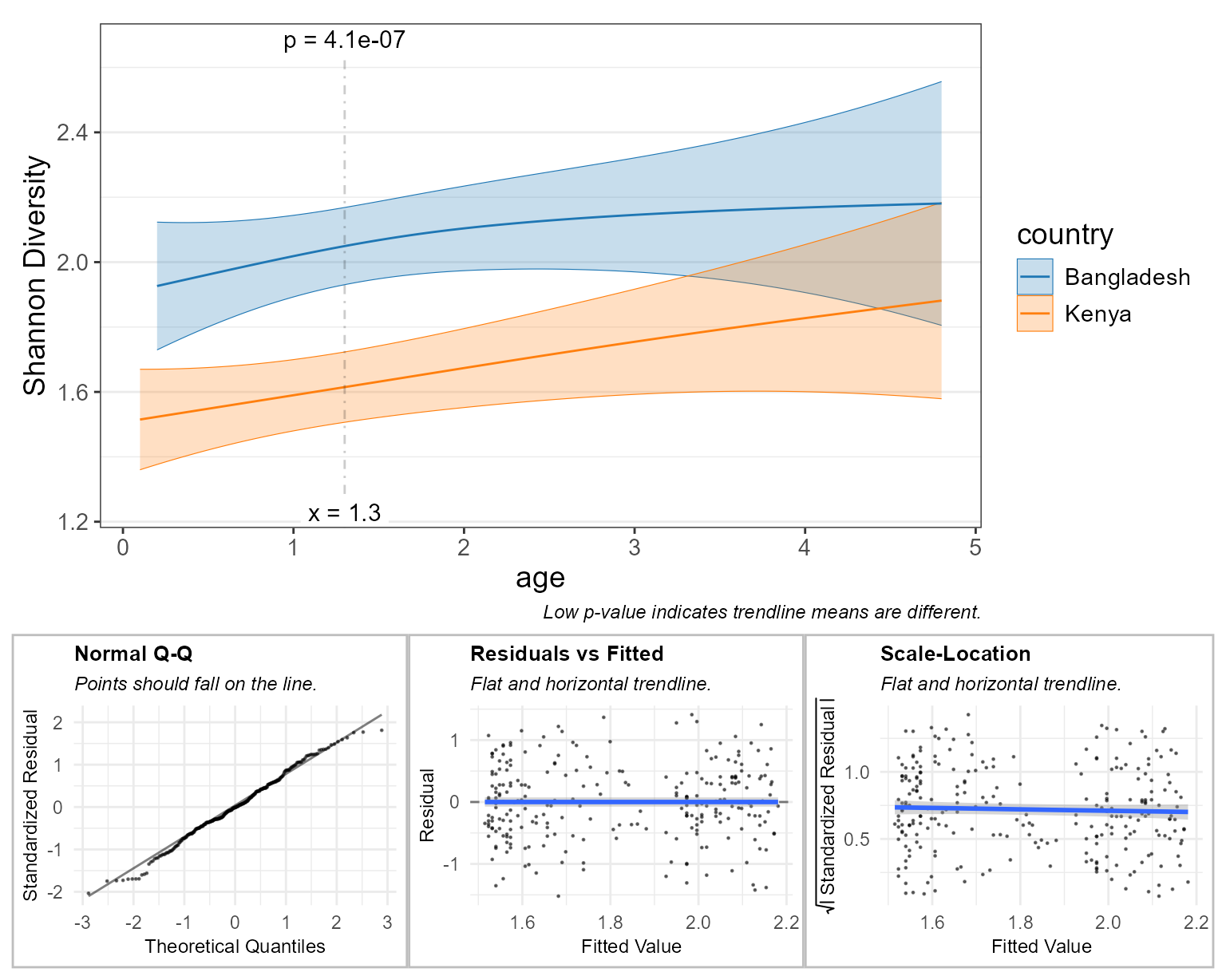
Here, the diagnostic plots look pretty good, so we can trust the model’s comparison of Shannon diversity between children in Bangladesh and Kenya at the median age.
Taxa Abundance
Similar to adiv_corrplot(), taxa_corrplot()
combines taxa_table() and stats_corrplot()
into a single streamlined function.
We’ll set layers = "tcrp" to show the residuals on this
main plot. This will help in explaining an artifact on the “Residuals vs
Fitted” diagnostic plot.
taxa_corrplot(
  biom    = hbk,         # healthy controls from Bangladesh and Kenya
  layers  = "tcrp",      # trendlines, conf. intervals, residuals, & points
  x       = "age",       # x-axis variable
  taxa    = 1,           # select the most abundant taxa
  rank    = "Genus",     # at the genus level
  stat.by = "country",   # statistical groups
  fit     = "gam",       # smoothed trendline
  t.size  = 2,           # make the trendline thicker
  check   = TRUE )       # display diagnostic plots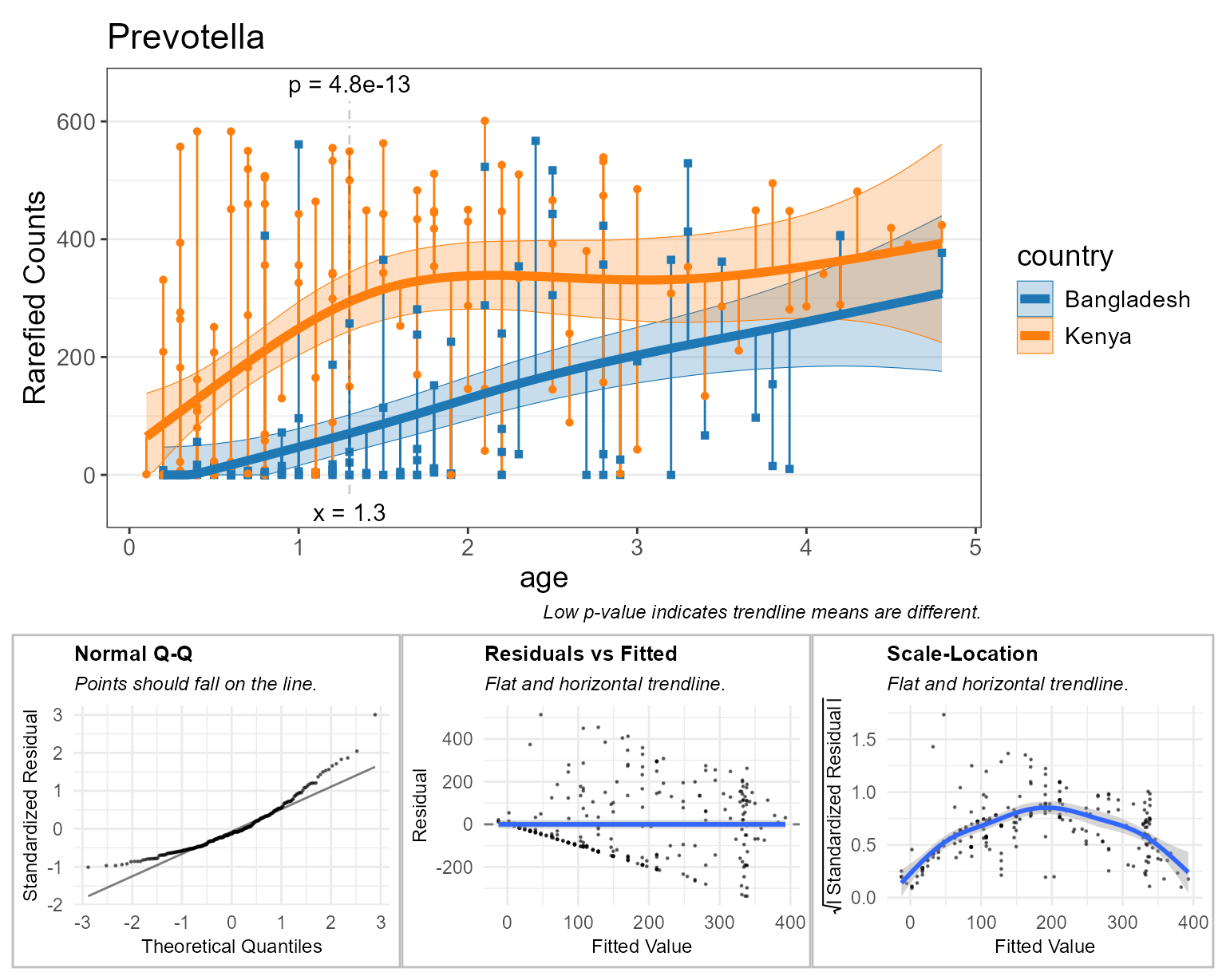
Above, all the orange and blue points falling on y=0 indicate there are zero Prevotella reads for that sample. This can confound taxa abundance analyses, as indicated by the diagnostic plots.
- Normal Q-Q: This curved shape indicates residuals are more often below the trendline.
- Residuals vs Fitted: The points forming a straight black diagonal ‘line’ are the result of a overabundance of a single value in the data (zero).
- Scale-Location: The first half of the curve is due to lots of zero counts. The second half of the curve is due to having few samples with greater than 350 rarefied Prevotella counts, thereby allowing the gam curve to intercept those sample points with better precision.
Rank Transformation
One method for addessing zero abundances is to rank tranform all the
abundances. In rbiom, setting trans = "rank" will rank
transform all the abundances, without consideration of facets. The
default parameters ties = "random", seed = 0 will assign
unique integers (see base::rank() for other
ties options).
This will improve the diagnostic plots, but adds noise to the data.
taxa_corrplot(
  biom    = hbk,         # healthy controls from Bangladesh and Kenya
  layers  = "tcrp",      # show residuals on the main plot
  x       = "age",       # x-axis variable
  taxa    = 1,           # select the most abundant taxa
  rank    = "Genus",     # at the genus level
  stat.by = "country",   # statistical groups
  fit     = "gam",       # smoothed trendline
  trans   = "rank",      # rank-transform the abundances   <====
  t.size  = 2,           # make the trendline thicker
  check   = TRUE )       # display diagnostic plots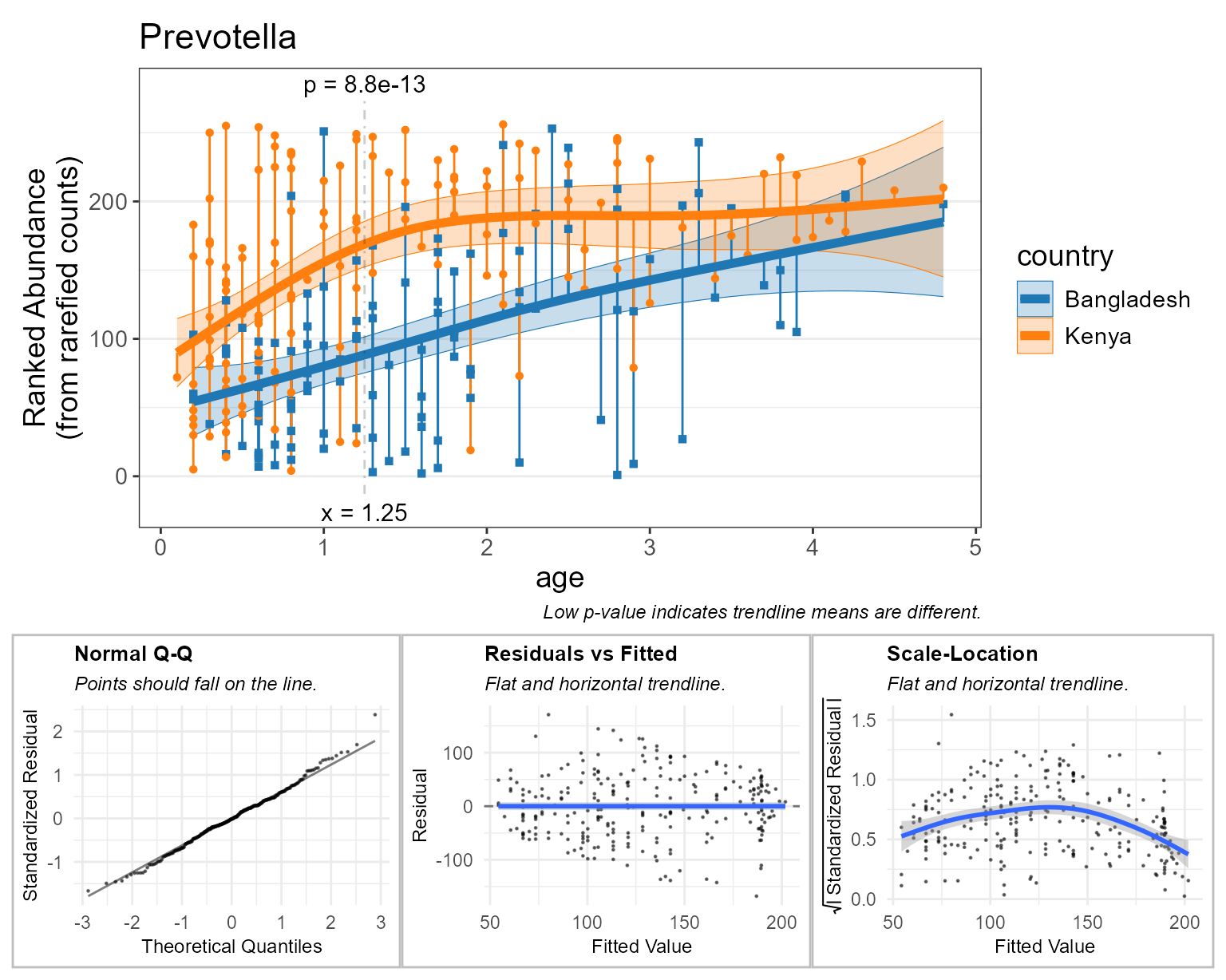
Beta Diversity
Like the last two corrplot functions, bdiv_corrplot()
combines bdiv_table() and stats_corrplot() to
generate a beta diversity correlation plot from an rbiom object.
Beta diversity correlation plots are more conceptually complex, so let’s quickly review what we’ll be plotting.
- x-axis: the difference in a numeric metadata field between two samples.
- y-axis: the difference in overall microbiome composition.
As with most bdiv_* functions, we can supply a
within and/or between parameters to limit
which pairs of samples are included in the plot. Setting
within = "country" as below will only plot pairs of samples
that came from the same country, and prevent stat.by from
producing a “Bangladesh vs Kenya” trendline.
bdiv_corrplot(
  biom    = hbk,         # healthy controls from Bangladesh and Kenya
  x       = "age",       # x-axis variable
  stat.by = "country",   # statistical groups
  within  = "country",   # don't compare samples from different countries
  fit     = "gam" )      # smoothed trendline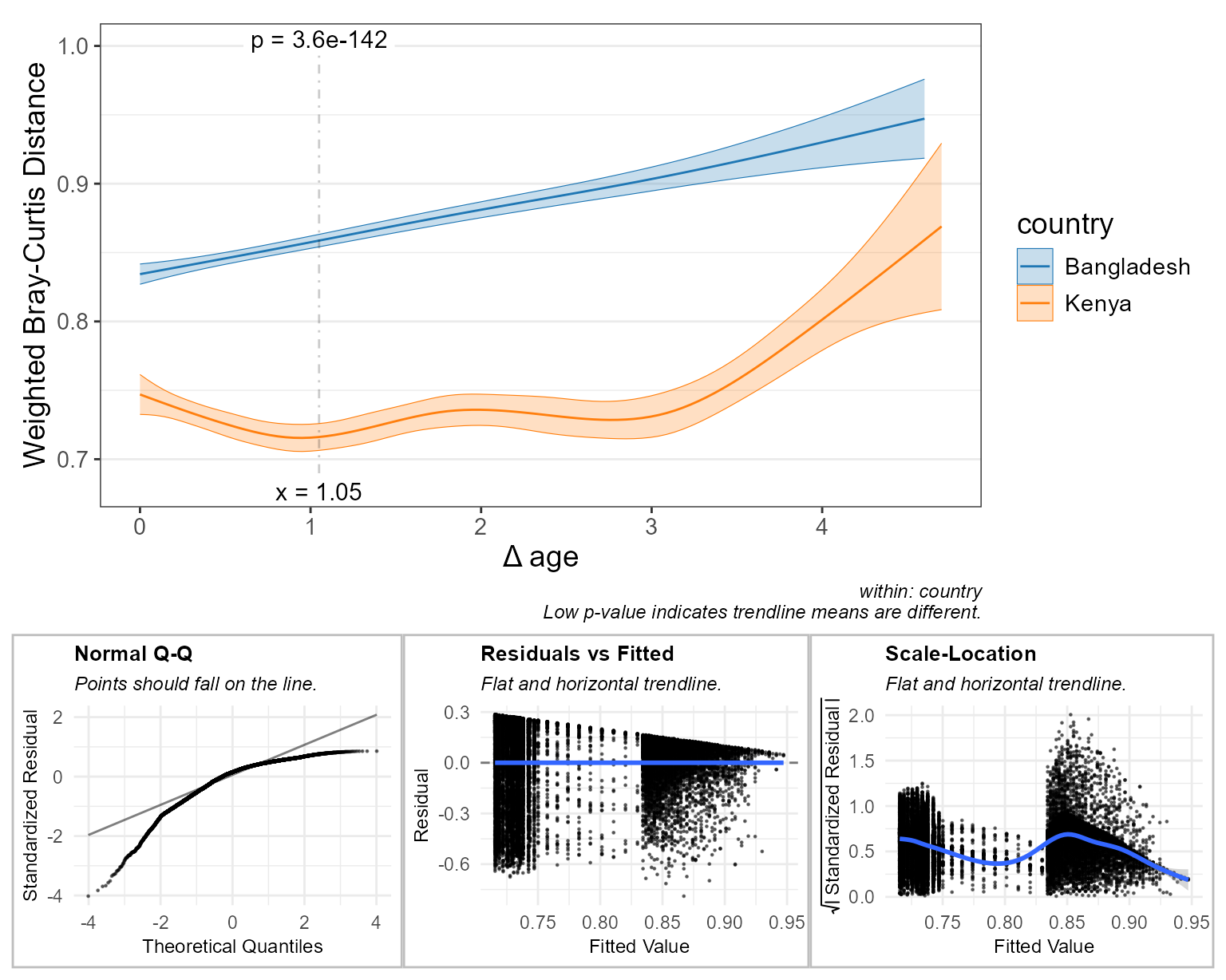
The trendlines show how microbiome dissimilarity grows with the difference in age, separately for each country.
The p-values come from Mantel tests, not from the trendlines. Each
sample appears in many pairs, so pairwise distances are not independent
observations, and regression p-values computed on them would be far too
small. A Mantel test instead correlates the distance matrix with the age
differences and judges that correlation against permutations of the
samples. With stat.by, one Mantel test is run per
group.
bdiv_stats(hbk, regr = "age", stat.by = "country")
#> # Test:     Mantel (Spearman) ~ age; 999 permutations.
#> # A tibble: 2 × 5
#>   country       .n  .stat .p.val .adj.p
#>   <fct>      <int>  <dbl>  <dbl>  <dbl>
#> 1 Bangladesh   116 0.198   0.001  0.002
#> 2 Kenya        140 0.0644  0.058  0.058
Specific Timepoints
By default, group means (and, for smoothed fits, slopes) are compared
at the median of the x-axis variable. You can choose a different
position by providing the at parameter. Pick these
positions based on your research question, before looking at the
results: scanning many positions for the smallest p-value produces false
positives.
stats_corrplot(npregfast::children, 'age', 'height', stat.by = 'sex', at = 12)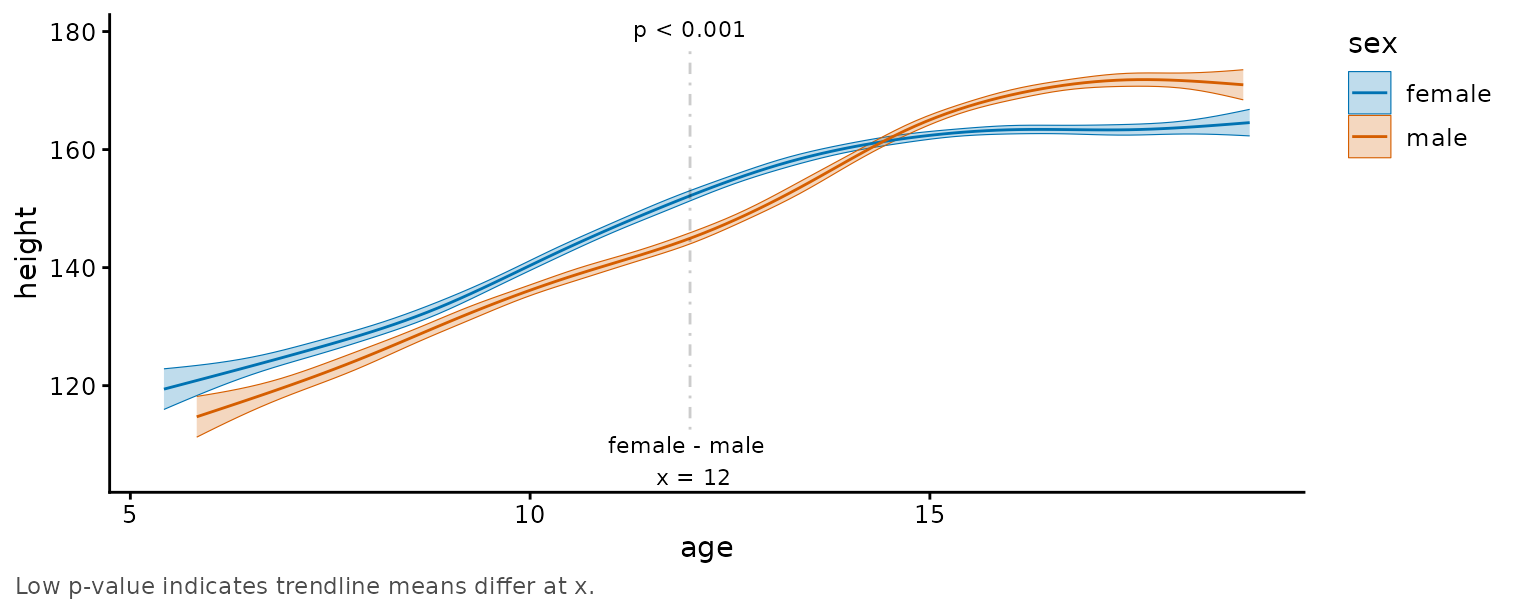
Although you’re limited to one at value for
*_corrplot() functions, you can provide multiple
at locations to stats_table() or
*_stats() functions. The .adj.p column adjusts
for all of them together.
stats_table(npregfast::children, 'age', 'height', stat.by = 'sex', at = 11:15)
#> # Model:    gam(.resp ~ s(.regr, by = .stat.by, bs = "cs") + .stat.by, method =
#> #   'REML')
#> # A tibble: 5 × 18
#>     age sex        .mean.diff .h1     .p.val   .adj.p .lower .upper .effect.size
#>   <int> <chr>           <dbl> <fct>    <dbl>    <dbl>  <dbl>  <dbl>        <dbl>
#> 1    12 female - …       7.26 != 0  2.34e-28 1.17e-27  5.99    8.53        1.13
#> 2    11 female - …       6.03 != 0  1.16e-21 2.90e-21  4.80    7.25        0.940
#> 3    13 female - …       6.10 != 0  1.85e-20 3.09e-20  4.82    7.38        0.951
#> 4    15 female - …      -2.59 != 0  9.01e- 7 1.13e- 6 -3.63   -1.56       -0.404
#> 5    14 female - …       2.00 != 0  3.84e- 4 3.84e- 4  0.896   3.10        0.311
#> # ℹ 9 more variables: .se <dbl>, .n <int>, .df <dbl>, .t.ratio <dbl>,
#> #   .r.sqr <dbl>, .dev.expl <dbl>, .aic <dbl>, .bic <dbl>, .loglik <dbl>