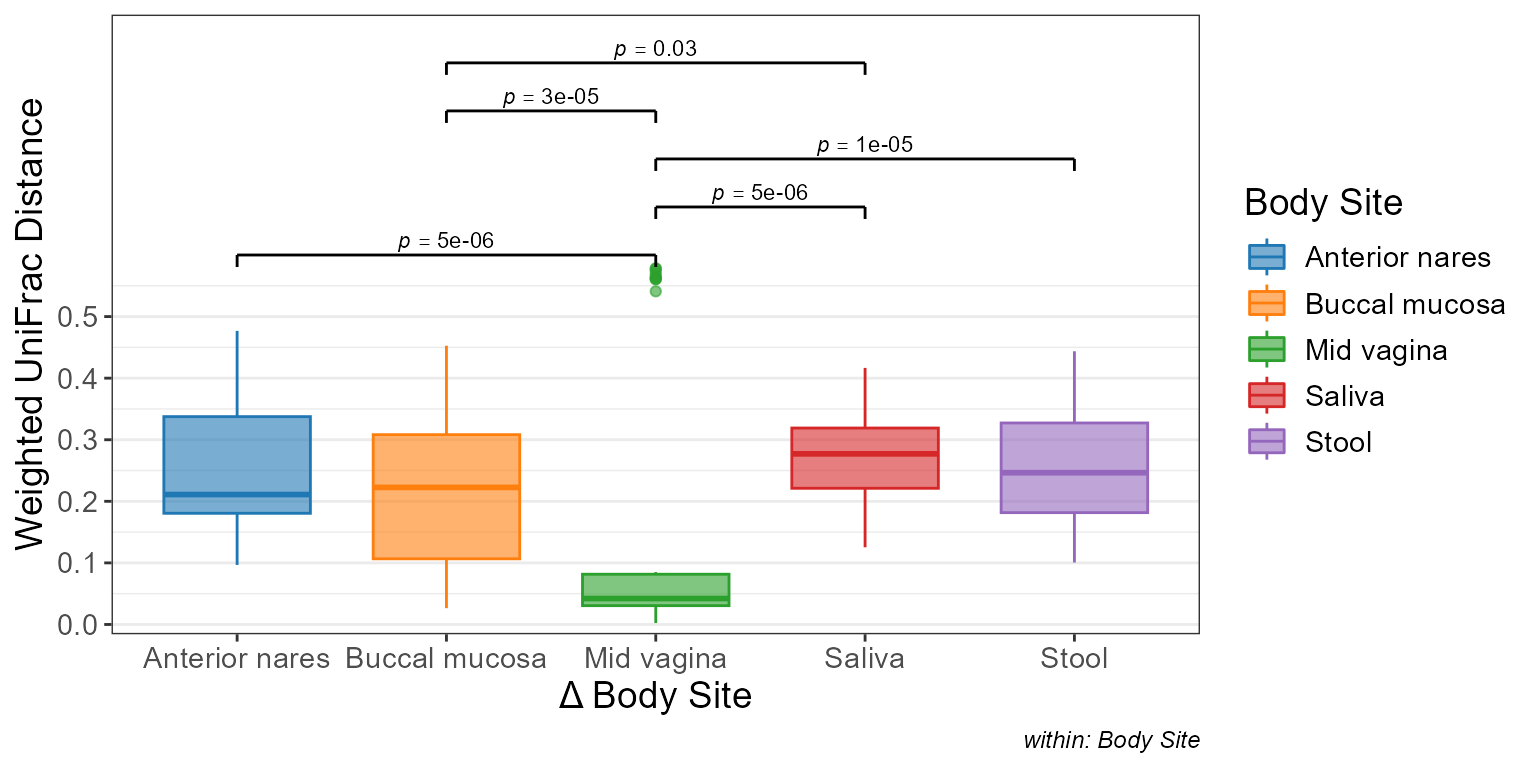
Visualize BIOM data with boxplots.
Usage
bdiv_boxplot(
  biom,
  x = NULL,
  bdiv = "bray",
  layers = "x",
  weighted = NULL,
  tree = NULL,
  within = NULL,
  between = NULL,
  stat.by = x,
  facet.by = NULL,
  colors = TRUE,
  shapes = TRUE,
  patterns = FALSE,
  test = "auto",
  flip = FALSE,
  stripe = NULL,
  ci = "ci",
  level = 0.95,
  p.adj = "fdr",
  outliers = NULL,
  xlab.angle = "auto",
  p.label = 0.05,
  transform = "none",
  strata = NULL,
  seed = 0,
  permutations = 999,
  caption = TRUE,
  alpha = 0.5,
  cpus = n_cpus(),
  ...
)
Arguments
- biom
An rbiom object, or any value accepted by
as_rbiom().- x
A categorical metadata column name to use for the x-axis. Or
NULL, which groups all samples into a single category.- bdiv
Beta diversity distance algorithm(s) to use. Options are:
c("aitchison", "bhattacharyya", "bray", "canberra", "chebyshev", "chord", "clark", "sorensen", "divergence", "euclidean", "generalized_unifrac", "gower", "hamming", "hellinger", "horn", "jaccard", "jensen", "jsd", "lorentzian", "manhattan", "matusita", "minkowski", "morisita", "motyka", "normalized_unifrac", "ochiai", "psym_chisq", "soergel", "squared_chisq", "squared_chord", "squared_euclidean", "topsoe", "unweighted_unifrac", "variance_adjusted_unifrac", "wave_hedges", "weighted_unifrac"). For the UniFrac family, a phylogenetic tree must be present inbiomor explicitly provided viatree=. Supports partial matching. Multiple values are allowed for functions which return a table or plot. Default:"bray"- layers
The elements to draw for each group, such as boxes, violins, dots, or error bars. One or more of
c("bar", "box" ("x"), "violin", "dot", "strip", "crossbar", "errorbar", "linerange", "pointrange"). Single letter abbreviations are also accepted. For instance,c("box", "dot")is equivalent toc("x", "d")and"xd". Default:"x"- weighted
(Deprecated - weighting is now inherent in bdiv metric name.) Take relative abundances into account. When
weighted=FALSE, only presence/absence is considered. Multiple values allowed. Default:NULL- tree
A
phyloobject representing the phylogenetic relationships of the taxa inbiom. Only required when computing UniFrac distances. Default:biom$tree- within, between
Dataset field(s) for intra- or inter- sample comparisons. Alternatively, dataset field names given elsewhere can be prefixed with
'=='or'!='to assign them towithinorbetween, respectively. Default:NULL- stat.by
Dataset field with the statistical groups. Must be categorical. Default:
NULL- facet.by
Dataset field(s) to use for faceting. Must be categorical. Default:
NULL- colors
How to color the groups. Options are:
TRUE-Automatically select colorblind-friendly colors.
FALSEorNULL-Don't use colors.
- a palette name -
Auto-select colors from this set. E.g.
"okabe"- character vector -
Custom colors to use. E.g.
c("red", "#00FF00")- named character vector -
Explicit mapping. E.g.
c(Male = "blue", Female = "red")
See "Aesthetics" section below for additional information. Default:
TRUE- shapes
Shapes for each group. Options are similar to
colors's:TRUE,FALSE,NULL, shape names (typically integers 0 - 17), or a named vector mapping groups to specific shape names. See "Aesthetics" section below for additional information. Default:TRUE- patterns
Patterns for each group. Options are similar to
colors's:TRUE,FALSE,NULL, pattern names ("brick","chevron","fish","grid", etc), or a named vector mapping groups to specific pattern names. See "Aesthetics" section below for additional information. Default:FALSE- test
Permutation test for comparing the groups.
'auto'and'adonis2'run PERMANOVA;'mrpp'and'betadisper'are also available (seebdiv_stats()). The tests permute samples, not the plotted pairwise distances.'none'skips the statistics. Default:'auto'- flip
Transpose the axes, so that taxa are present as rows instead of columns. Default:
FALSE- stripe
Shade every other x position. Default: same as flip
- ci
How to calculate min/max of the crossbar, errorbar, linerange, and pointrange layers. Options are:
"ci"(confidence interval),"range","sd"(standard deviation),"se"(standard error), and"mad"(median absolute deviation). The center mark of crossbar and pointrange represents the mean, except for"mad"in which case it represents the median. Intervals are drawn as computed, including below zero, unless the y-axis is transformed: bounds below zero are drawn at zero on a"sqrt"or"log1p"axis, and bounds at or below zero are drawn at the smallest positive y value on a log axis. Default:"ci"- level
The confidence level for calculating a confidence interval. Default:
0.95- p.adj
Method to use for multiple comparisons adjustment of p-values. Run
p.adjust.methodsfor a list of available options. The adjustment spans every p-value in the returned table (all metrics, strata, pairs, and positions). Default:"fdr"- outliers
Show boxplot outliers?
TRUEto always show.FALSEto always hide.NULLto only hide them when overlaying a dot or strip chart. Default:NULL- xlab.angle
Angle of the labels at the bottom of the plot. Options are
"auto",'0','30', and'90'. Default:"auto".- p.label
Minimum adjusted p-value to display on the plot with a bracket.
p.label = 0.05-Show p-values that are <= 0.05.
p.label = 0-Don't show any p-values on the plot.
p.label = 1-Show all p-values on the plot.
If a numeric vector with more than one value is provided, they will be used as breaks for asterisk notation. Default:
0.05- transform
Transformation to apply to calculated values. Options are:
c("none", "rank", "log", "log1p", "sqrt")."rank"is useful for correcting for non-normal distributions before applying regression statistics. Default:"none"- strata
Dataset field with the blocking/subject variable. Permutation tests permute within strata; regression models include a random intercept per stratum. Default:
NULL- seed
Random seed for permutations, rarefaction, random tie-breaking, and stochastic ordinations. Results are reproducible for a given seed, and the caller's random number generator state is left unchanged. Must be a non-negative integer. Default:
0- permutations
Number of random permutations to use. Default:
999- caption
Add methodology caption beneath the plot. Default:
TRUE- alpha
The alpha term to use in Generalized UniFrac. How much weight to give to relative abundances; a value between 0 and 1, inclusive. Setting
alpha=1is equivalent to Normalized UniFrac. Default:0.5- cpus
The number of CPUs to use. Set to
NULLto use all available, or to1to disable parallel processing. Does not affect results. Default:ecodive::n_cpus()(all available cores)- ...
Additional parameters to pass along to ggplot2 functions. Prefix a parameter name with a layer name to pass it to only that layer. For instance,
d.size = 2ensures only the points on the dot layer have their size set to2. Unprefixed parameters go to every layer whose function accepts them (e.g.scales = "free"for the facets). An argument that no layer accepts is an error.
Value
A ggplot2 plot. The computed data points, ggplot2 command,
stats table, and stats table commands are available as $data,
$code, $stats, and $stats$code, respectively.
Aesthetics
The default colors are colorblind-friendly for up to 12 groups: Okabe and
Ito's palette ("okabe") for up to 8, and Paul Tol's ("tol") for 9-12.
Of the other palettes, "bright", "vibrant", "muted", "light", and
"carto" are also designed for color vision deficiencies. The available
categorical palette names are: "okabe", "carto", "r4",
"polychrome", "tol", "bright", "light",
"muted", "vibrant", "tableau", "classic",
"alphabet", "tableau20", "kelly", and "fishy".
Patterns are added using the fillpattern R package, which must be
installed to use patterns. Options are "brick",
"chevron", "fish", "grid", "herringbone", "hexagon", "octagon",
"rain", "saw", "shingle", "rshingle", "stripe", and "wave",
optionally abbreviated and/or suffixed with modifiers. For example,
"hex10_sm" for the hexagon pattern rotated 10 degrees and shrunk by 2x.
See fillpattern::fill_pattern() for complete documentation of options.
Shapes can be given as per base R - numbers 0 through 17 for various shapes, or the decimal value of an ascii character, e.g. a-z = 65:90; A-Z = 97:122 to use letters instead of shapes on the plot. Character strings may used as well.
The dot and strip layers use the ggbeeswarm package when it is installed, and jittered points otherwise.
See also
Other beta_diversity:
bdiv_clusters(),
bdiv_corrplot(),
bdiv_heatmap(),
bdiv_ord_plot(),
bdiv_ord_table(),
bdiv_stats(),
bdiv_table(),
distmat_stats()
Other visualization:
adiv_boxplot(),
adiv_corrplot(),
bdiv_corrplot(),
bdiv_heatmap(),
bdiv_ord_plot(),
plot_heatmap(),
rare_corrplot(),
rare_multiplot(),
rare_stacked(),
stats_boxplot(),
stats_corrplot(),
taxa_boxplot(),
taxa_corrplot(),
taxa_forest(),
taxa_heatmap(),
taxa_stacked(),
theme_rbiom()